


Expectations change, timelines shift — hell, entire plans blow up — but good preconstruction is how you make sure the project doesn’t.
The success of any new development depends on how well we understand and control costs from day one. Ediphi is a cloud-based cost management tool that helps you streamline the process (and save hours per estimate), and cost modeling is the engine behind it all, supporting everything from conceptual estimating to target value design.
Here’s what cost modeling is, key features to look for in a cost modeling tool, and how to build your first one.
What is cost modeling?
A cost model in preconstruction is a structured breakdown of a project’s expected costs used to estimate, track, and forecast budget impacts before construction begins.
Typically, cost models include:
- A detailed cost breakdown by trade (sitework, structure, MEP, interiors, etc.)
- Line-item scope and quantities tied to building components
- Unit pricing and key assumptions so costs can be updated as design evolves
- Allowances, escalations, and contingency to account for the unknowns
- Alternative scenarios to compare options and track cost impacts over time
It organizes and categorizes costs holistically, allowing teams to understand where the money is going, how changes impact the total, and whether they’re on budget.
The problem with cost modeling in preconstruction
“Cost modeling sucks today!”
Construction veteran Dustin DeVan prefers to put things bluntly; but what he’s noticed about the industry is a persistent problem: most teams treat every client cost modeling request like a last-minute data scramble, instead of building a repeatable, reliable process.
“When you peel back the onion, you realize [companies] are investing a ridiculous amount of resources just to get the data into their cost modeling solutions,” he says.
This is because, historically, cost modeling is done across dozens of disparate systems.
For many teams, that still means Excel, which works fine — until you need to scale, collaborate, or report consistently. The problem is that Excel estimates are often:
- Built differently every time (different formats, formulas, naming conventions)
- Hard to consolidate across projects, phases, or teams
- Easy to break with one bad link, overwritten cell, or version mix-up
- Stored everywhere (email attachments, shared drives, messy “final_v7_REAL.xlsx” files)
And while desktop estimating tools sound like an upgrade, they often create the same issue in a different wrapper: the estimate typically lives on someone’s machine until it’s manually exported, emailed, or uploaded somewhere else.
Getting estimates into a centralized cost model becomes a constant cycle of exporting, cleaning, reformatting, and re-entering data. And that’s where the real time gets burned.
👉 If you’re an Excel-heavy team, Excel Add-Ins can help you integrate your data directly into the cloud.
The solution? Cloud-based cost modeling
Cost modeling only works when estimating and historical data live together in the cloud.
Why the blanket statement?
Because, the fact is, teams don’t lose bids (and profit) because they can’t estimate. They’re losing them because every new model turns into a hunt for the “right” spreadsheet, the latest export, and whatever version someone saved to a shared drive three weeks ago.
In the cloud, cost models:
- Pull from a historical cost database so costs are consistent and key drivers are captured the same way every time
- Eliminate the import/export treadmill (export, clean up, reformat, re-enter) that slows teams down and introduces errors
- Make benchmark estimates instantly reusable, so teams can pull relevant past projects into a model and build faster
Key features of cost modeling in Ediphi
Perhaps we’re a little biased.
But we sincerely believe that Ediphi is the industry standard for cloud-based preconstruction and we’ve built our cost modeling solution as the heart of a connected estimating process.
Here are a few of our most powerful cost modeling capabilities.
- Group filters: Hide irrelevant scope when benchmarks don’t match your project (ex: exclude “Gym” if your new apartment doesn’t have one).
- Unit specs and unit swapping: View cost the way owners ask for it (ex. cost/key for hotels, cost/kW for data centers, cost/unit for apartments)
- Time and location escalation: Automatically adjust benchmark costs for when and where the new project will be built.
- Inline editing: Edit totals or rates directly in the model without changing the original benchmark estimate.
- Markups inside the model: Pull markups from comparison estimates and keep the math running dynamically.
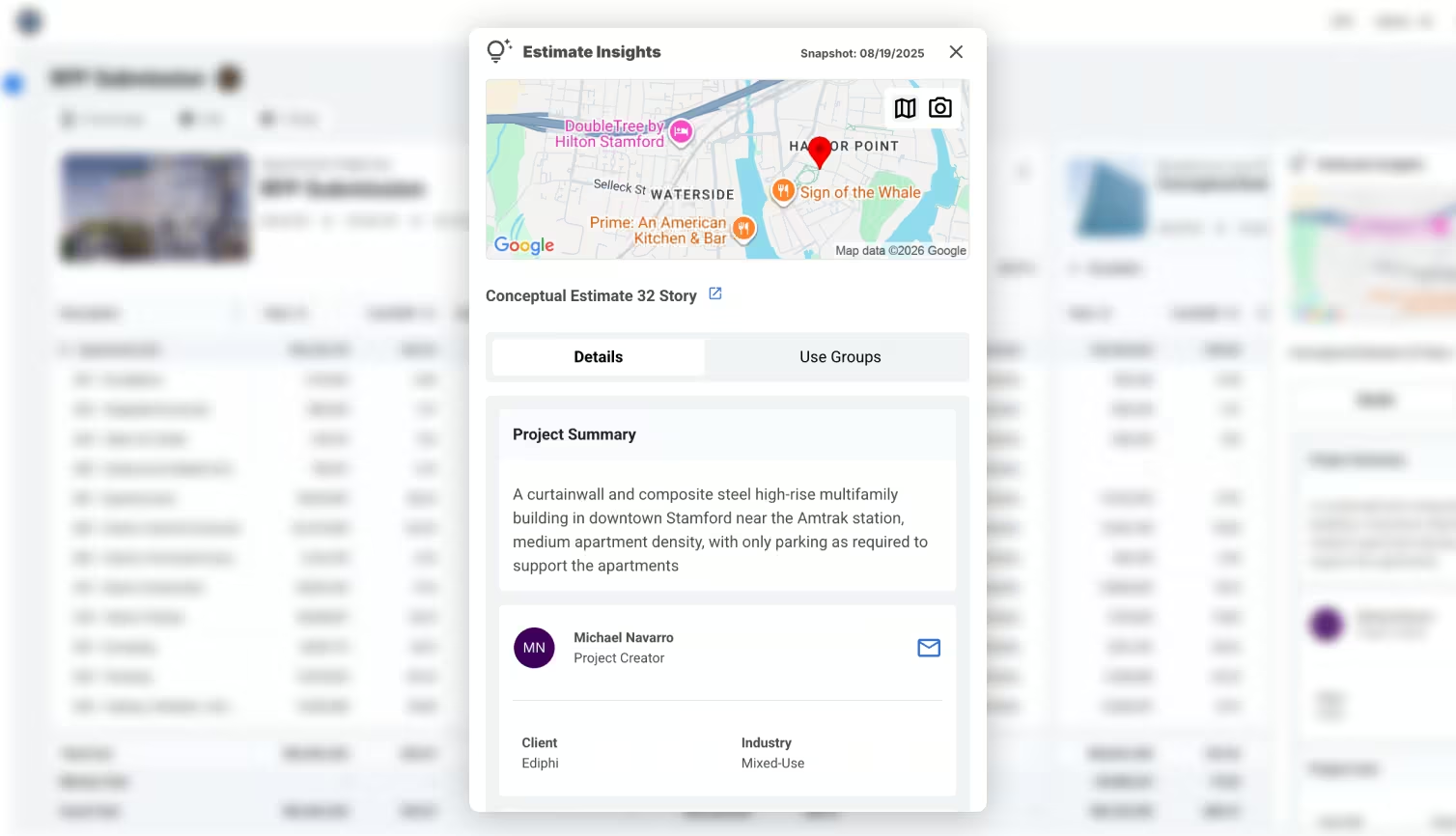
- Estimate insights while modeling: Click on the 💡 icon next to each benchmarked estimate on the list to get “Estimate Insights” like project cost or use Groups within the estimate.
How to build a cost model in Ediphi
A solid first cost model in Ediphi follows a basic formula:
Picking the right benchmarks → aligning scope → entering your project drivers → adjusting for time/location, then → refining.
Step 1: Benchmark the estimates you actually trust
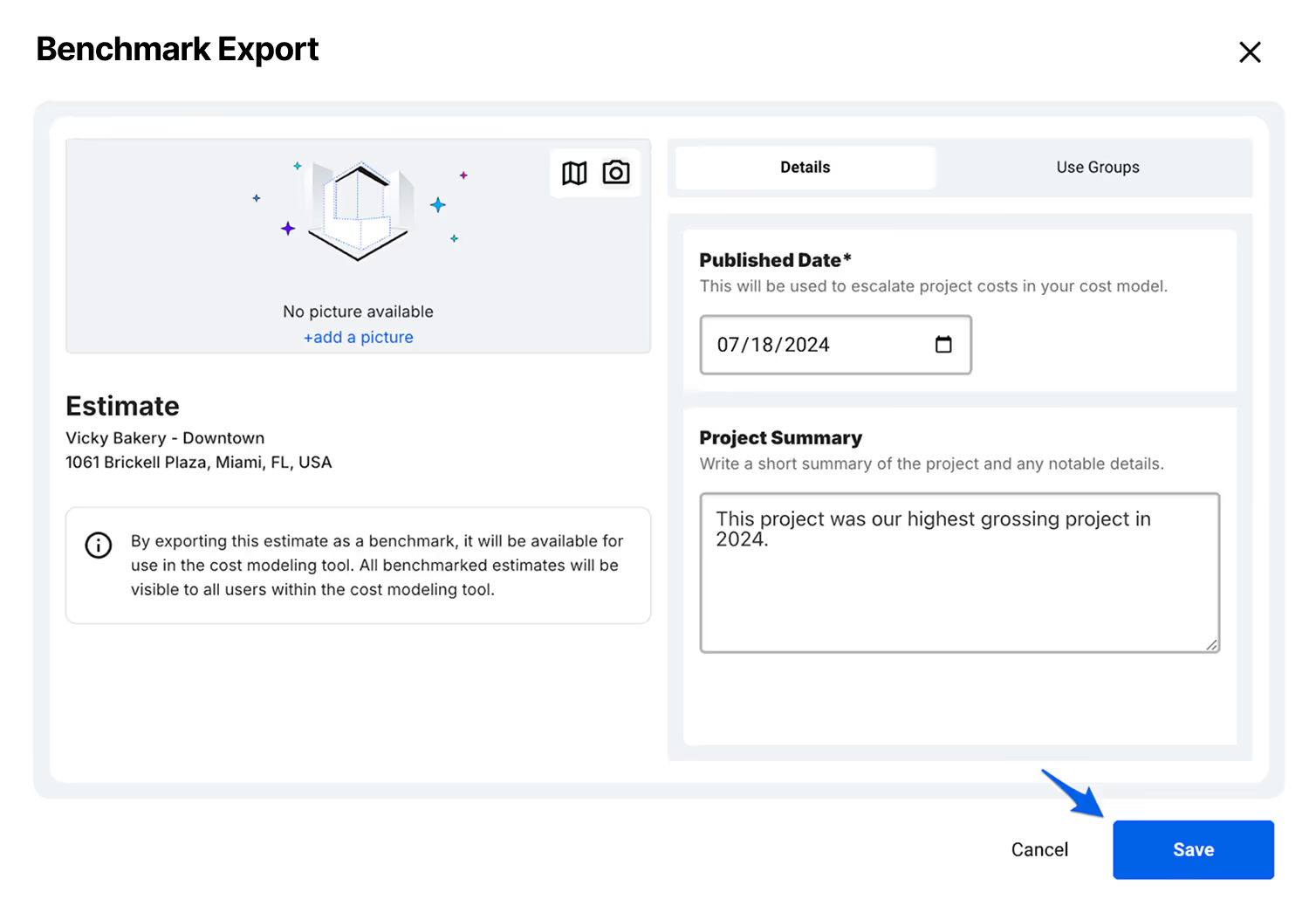
Benchmarking “archives” a finalized estimate so you can use it as a comparison project later. When you benchmark, you’ll also add helpful context like a published date and a short project summary.
Step 2: Create a cost model & add the estimates
Create a cost model from the project overview and select the benchmarked estimates you want to compare against (and continue…there’s no limit to how many you can add.)
Step 3: Select Use Groups and enter your project quantities
Ediphi will show the available Use Groups pulled from your benchmarks. Choose the ones you want in the model and enter the quantities for your current project (so the averages and cost/unit comparisons are meaningful).
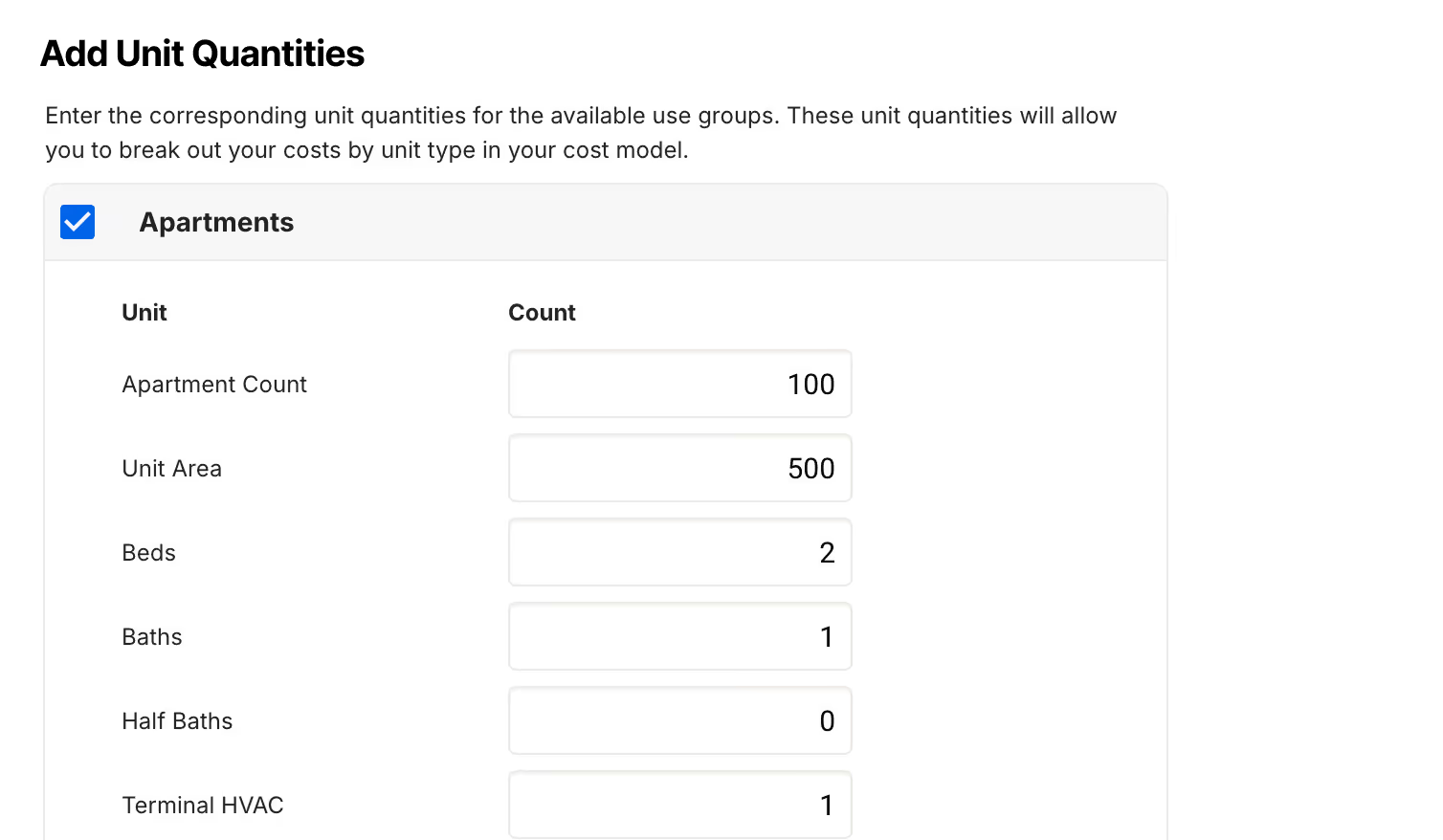
Psst..you can skip this step if you don’t have the quantities, but you’ll lose a lot of comparison power.
Step 4: Review escalation
Once your benchmarks are in, Ediphi automatically adds year rows under Escalation based on the estimate’s published dates and when the cost model was created. You can also add future escalation from there.
Step 5: Add missing scope (optional, but common)
If your benchmarks don’t include something you need, you can add new Use Groups directly to the cost model. If you add new Use Groups, Ediphi prompts you to enter their quantities. You can also add Sort Codes based on your model’s groupings to keep tracking clean.
Cost modeling FAQs
What’s the difference between a cost model and an estimate?
An estimate is typically a point-in-time number. A cost model is a structured framework behind that number built to evolve as scope, pricing, and assumptions change.
What level of detail should a cost model include?
Enough detail to explain major cost drivers and support decision-making. Early models are often assembly-based, then become more detailed as design progresses and scope is defined.
When should a cost model be updated?
Any time the scope changes or new information becomes available, but typically at key milestones like concept, schematic design, design development, and before GMP or bid.
What’s included in contingency and escalation?
Contingency covers unknowns and design uncertainty. Escalation accounts for projected cost increases over time due to market conditions, inflation, and schedule.
Read more here for Ediphi-specific FAQs on cost modeling.
Ready to build your first cost model?
Cost models are meant to be dynamic, updating as designs evolve, shifting with the scope, and reflecting all pricing changes.
In Ediphi, everything starts with the cost model; it’s the foundation for every scenario, every update, and every decision. From there, you can benchmark smarter, model faster, and stop rebuilding estimates from scratch every time something changes.
If you’re ready to get started, set up your first cost model in Ediphi or request a demo of cost modeling.

.svg)




.svg)
.svg)