Since the beginning of Ediphi, GCs with a self-perform division ask us the same thing: Can our trade estimators work in Ediphi too?
Starting with labor, we’ve been working hard to finally say the answer is yes.
Labor & Crews is now live in Ediphi and it's the first release on our Trade Estimating roadmap. It lets self-perform and trade estimators price labor from their own crews and production rates on the same platform as their GC team.
In short, you can
- Build a crew from your labor resources and their standard, OT, and DT rates
- Apply it to a line item
- Enter a production rate
- And then Ediphi calculates crew hours, blended rate, total labor, and labor unit cost right on the line
💡For teams that have been pricing crews in Sage, Destini, WinEst, or Excel, then emailing a rollup to the GC side to reconcile by hand, that's one less tool and one less handoff
Here's what's in the release, and why we started with labor.
Why self-perform and why now
Self-perform is a full profit center. In addition to removing that trade partner markup, it gives GCs much more control over schedule and quality.
But the more work a GC self-performs, the more its cost history starts to split. GC estimates live in one system and the self-perform estimates live in another, built on crews and production rates the GC side never sees.
Ediphi is built to be the one platform where every estimator works and the whole organization's cost history lives. Self-perform was the missing piece. Looking back on 2025, we said trade-specific estimating for self-performing GCs was coming. We started with labor because it's the hardest part of a self-perform number to pin down and this is where it starts.
What's possible with Labor & Crews
Build crews the way they show up on site
Start with labor resources, each with its own standard, OT, and DT rate. A carpenter might carry $50, $75, and $100, and those are your numbers, so premium time is handled the way you handle it.
Group resources into crews, with a quantity and rate type for each member: two rod busters at standard, one foreman at OT. The blended rate is calculated from the crew, not typed in. (And yes, a crew can be one person.)
See the math on every line
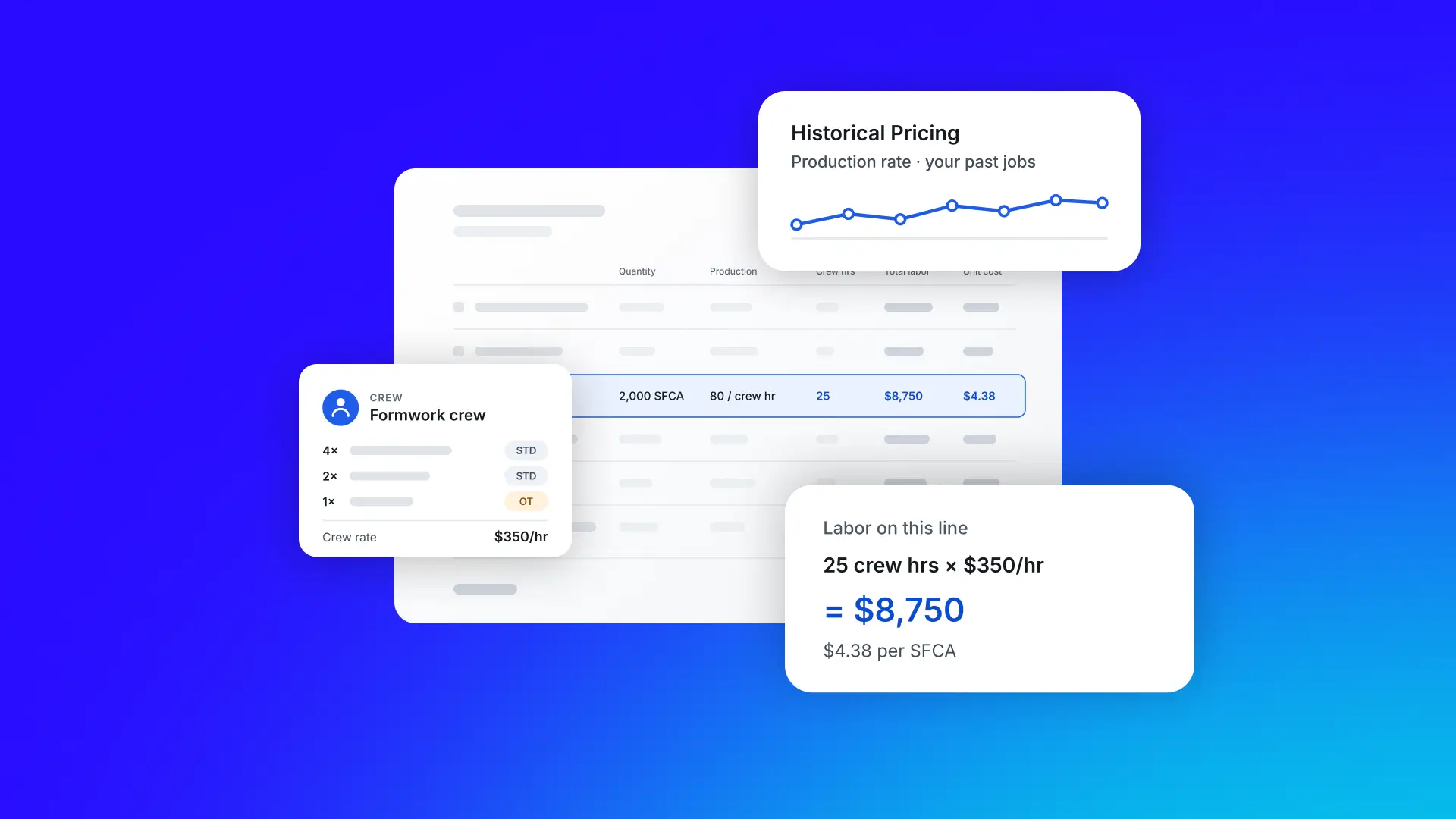
Apply a crew to a line item, enter the quantity and a production rate the way your trade tracks it, in crew hours or individual hours per unit. Ediphi calculates the rest: crew hours, individual hours, crew rate, individual rate, total labor, and labor unit cost.
Every one of those numbers is a column on the line, and the crew behind it is one click away. A senior estimator can check the work without reverse-engineering a black box.
On the line: A $350/hr formwork crew sets 80 SFCA per crew hour. On 2,000 SFCA of footing formwork, Ediphi calculates 25 crew hours, $8,750 in total labor, and $4.38 per SFCA.
Change a rate once
Say your rod buster rate goes from $45 to $50 mid-bid. You can update it, just once on the estimate, and every line that uses that resource, across every crew it’s in, recalculates on its own.
Set crews by region
Admins define resources and crews in the Unit Price Catalog with rates by region, so a carpenter at $50/hr in Atlanta and $75/hr in Boston carries the right rate into every estimate. Attach a crew to a product, and every estimate that uses that product starts with the right crew.
Each estimate gets its own copy of the crews it uses. Adjust a crew for one project and the catalog stays as it was. Build a crew that works on an estimate, save it to your own catalog, and an admin can share it with the whole team.
Crews inside your Assemblies
Set up assemblies in your catalog, like a slab with excavation, formwork, concrete, and placement. Each activity is its own line item with a product, a crew, and its own Historical Pricing. Bulk update activities across an estimate, and show an assembly’s cost in the unit you need, cubic yards or cubic feet.
Start from what you already have
If you’re already pricing crews somewhere else, you can bring that work directly into Ediphi.
- Import: Bring labor resources and crews in from CSV.
- Keep your all-inclusive rate: Enter the rate you build today and Ediphi will handle the crews, hours, and totals.
- Use your assemblies: Each activity in an assembly is its own line item, with a crew and its own Historical Pricing. Bulk update them across an estimate.
- Run it your way: Give your self-perform team its own catalog and pricing, or price self-performed work right inside a regular GC estimate.
Build a production history that compounds
Every line that uses a crew records crew size, hours per unit, and rate. Right-click any line to open Historical Pricing and see every past job where that scope was priced.
Your first estimate prices the job. By the tenth, your production rates come from your own projects, not someone's memory.
One platform, one cost history
In our view, the biggest shift is what your organization gets to keep after you build your first crew. Every self-perform estimate now adds to the same cost history as everything else, so the data behind a concrete bid is as searchable and reusable as the data behind the rest of the job.
Labor & Crews is already in the hands of self-perform GCs, including DPR and Hensel Phelps.
What's next
Labor & Crews is the first step and we have more coming for trade estimators:
- Rate breakouts: See what makes up each labor rate, with burdens, margins, and sub-costs that roll up into the total.
- Assembly questionnaires: Answer a few questions about the spec and the means and methods, and the assembly fills in its own line items and quantities.
- AI for your crews: Ask about the crews you've priced before and get answers with the source. Every estimate you price today builds the history it learns from.
Labor & Crews is available now in Ediphi.
If you're an existing customer, reach out to your customer success contact for a walkthrough. If you're not on Ediphi yet, get a demo and we’ll show you the math.